Bugs
Known software issues with provided workaround solutions.
Check it out
Esri Lebanon Support.
Esri Lebanon's support service is dedicated to providing timely and expert assistance to our users with all the information and guidance they need to achieve their objectives with Esri GIS software. Starting July 1, 2026, all support requests must be submitted through My Esri (Support → Request Case). If you contact us by phone, WhatsApp, or email, we may help with initial troubleshooting, but a My Esri case is required to track and resolve your issue.

All technical support requests must be opened in My Esri. You can request a case from your computer or mobile phone. Download the Esri Support app for additional options. Follow the steps below:
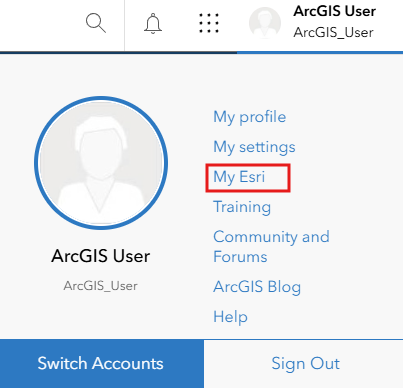
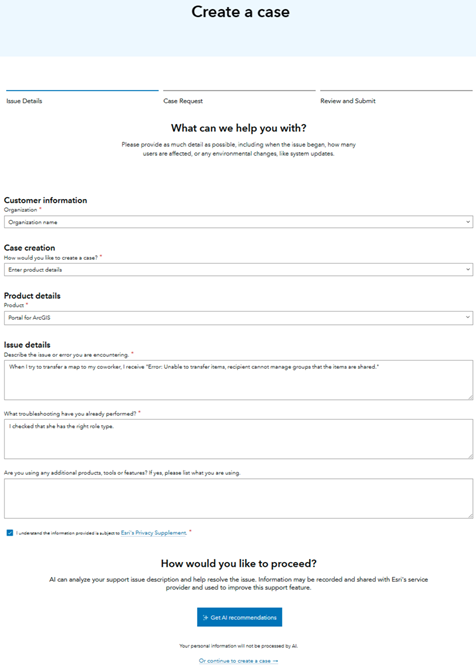
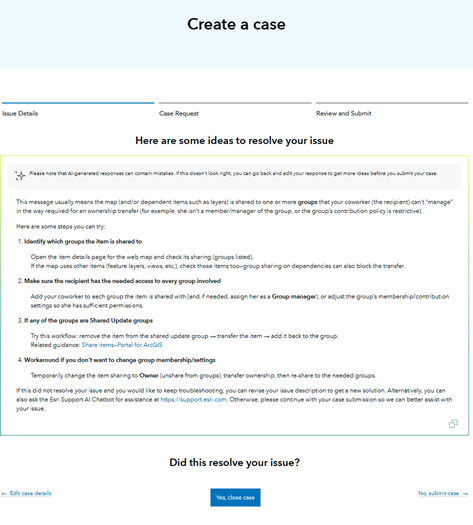
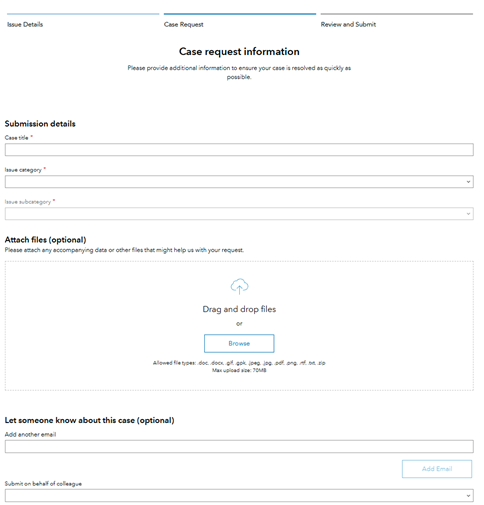
Esri Lebanon support team will review and respond to the submitted request.
The Knowledge Base includes several sections to assist users. The Bugs section addresses known software issues with workarounds and solutions, while Deprecation provides information on features slated for future removal. Enhancements highlights new features under review by our product teams. Technical Paper provides informational documents about Esri's solutions, products, and services.
In theNew Videos section, you will find the latest videos covering Esri news, updates, and features. Stay informed about new product releases, software updates, upcoming events, and insightful tutorials.